 ·The case for it·Measurements·Pricing
FR·EN·DE·ES·PT
·The case for it·Measurements·Pricing
FR·EN·DE·ES·PT
Most “film” plug-ins are a stack of filters applied to an already-finished image. CinePerfect does the opposite: it goes back up to the light of the scene, rebuilds the optical and photochemical chain there in the order it actually happens, then makes the displayable image at the very end.
That difference in architecture is what explains everything else.
What isn't destroyed upstream can still be recovered downstream. The reverse is never true.
Every source format is decoded into the same wide, scene-linear working space — the AP1 primaries of ACES. Values there are light, with no ceiling: a sky can be worth 40 times middle grey and stay that way.
In practice: raising saturation, adding contrast or pushing the diffusion never makes colours bleed or shift, because at no point is a value crushed against a ceiling.
Twelve curves implemented directly from the manufacturers' specifications, not approximated by a LUT. A conversion LUT quantises and loses precision exactly where log needs it most: in the shadows.
Each curve is validated before integration: continuity at the breakpoints and a numerical round trip.
Moving to Rec. 709 is the only moment you leave the wide space. Colours that don't fit aren't cut off: they are brought progressively towards the neutral axis, hue and brightness preserved.
That's the difference between a saturated red that settles and a red that flattens into a uniform block.
A multiplication of light in powers of two, applied right after the log decode. That is what an aperture does, and nothing else: the ratios between pixels are preserved, so neither hue nor saturation moves. A lift adds a constant and washes out the blacks; a gamma distorts saturation according to level. Neither one is an exposure.
And because it acts before the whole film chain, it does not merely brighten: it moves the image along the curve. Halation takes more, the shoulder does its work, density bites differently — like a lighter print. Zero is anchored on 18 % scene grey, so “+1 EV” means one stop. Final Cut has no native equivalent: its wheels, board and curves are lift/gamma/gain operations on an already-graded signal.
Temperature is not a red/blue gain. The gains are computed on the Planckian locus, then applied in cone space — the model that describes how the eye actually adapts to a light source.
The result: going from 3200 K to 6500 K keeps greys neutral and skin tones believable, where a per-channel gain greens the mids and pinks the highlights.
What most distinguishes a camera image from a sensor image. None of these modules touches colour.
The optical low-pass filter is fitted to every cinema camera: a birefringent crystal that splits the beam by roughly one photosite to suppress moiré. It is what gives professional digital its “soft” bite, as opposed to the electronic edge of filterless sensors.
CinePerfect simulates it with a four-point sub-pixel sampling, in scene light. It isn't a blur: it's a dispersion. The image stays sharp, it only loses its aggression.
Radial chromatic aberration — nil at the centre, growing towards the edges, as in a real optical group — and loss of definition in the corners.
These defects are placed at the level of the glass, so upstream: they are then diffused by mist and halation, exactly as in the real chain. Adding them at the end would be a decal; putting them at the start gives you a lens.
Applied in scene light, before the diffusion. Darkened corners therefore diffuse less — which is how a lens behaves, and what a darkening pasted on at the end of the chain cannot reproduce.
Its geometry is computed in the frame of the whole image: it stays continuous even when Final Cut cuts the frame into tiles for rendering.
Often lumped together as “glow”. They are three distinct physical phenomena, born in three different places — and CinePerfect places them in that order.
| Module | Born | Colour | Reach |
|---|---|---|---|
| Mist | In front of the lens | Neutral, across the whole image | wide |
| Bloom | Inside the glass | Neutral, around the sources | very wide |
| Halation | In the emulsion | Orange-yellow, measured at 27° | tight |
The three diffusions are added before the film curve. The added light then goes through the same rendering as the original light, and compresses like it.
That is the whole difference between a source that lights its surroundings and a white halo stuck on top. A bloom applied to the finished image can only wash it out; applied upstream, it makes light.
On real film, the antihalation layer absorbs and the scattering saturates: beyond a few stops, a brighter source doesn't produce a proportionally stronger halo. CinePerfect reproduces that ceiling.
Without it, a blown sky would pour out unbounded energy that the blur would spread into the shadows — where the film curve amplifies it most. That's the typical flaw of software halation: it veils the whole image instead of circling the sources.
What film does to light once it has received it.
Four sliders — blacks, mids, lights, highlights — driving exposure by tonal band before the film rendering. So they shape what feeds the curve.
That is something no Rec. 709 colour wheel can offer: they all act afterwards, on an image whose highlights are already compressed and whose latitude is already spent.
Contrast pivots on 18 % scene grey. Raising contrast therefore spreads shadows and lights apart without moving the image's perceived brightness — you don't spend your time re-correcting exposure behind it.
And because it acts before the curve, the highlights are absorbed by the film rolloff instead of being clipped.
Reshapes only the part of the curve above the knee. Middle grey and the shadows don't move a point — which makes it the shot-matching tool: you recover a sky without bringing the faces down with it.
The most visible difference between film and video comes down to one sentence: on an emulsion, a more intense colour is always darker. More dye absorbs more light. Video saturation, by contrast, lifts chroma at constant luminance — hence the electric look that gives a pushed digital image away.
The module reproduces that constraint: the purer a colour, the more it darkens, and a neutral grey stays strictly untouched. Calibrated against print stocks, which desaturate skin tones instead of saturating them. Measured on a skin tone: −5.7 points of luminance for +0.016 of saturation.
On a print, the three dye layers don't respond linearly: the image naturally loses its chroma in the toe and in the shoulder. Raw digital, by contrast, keeps coloured shadows all the way down — one of the causes of the “plastic” look.
The module is adjustable on both ends, and it preserves luminance: so it can neither change the exposure nor compromise the signal's legality.
Cold shadows, warm highlights — the signature of emulsions. Applied in scene light, before the curve, in cone space (the model of visual adaptation): the tint gets “developed” by the tonemap, as on a print.
And scene luminance is preserved exactly: a split tone that never disturbs the exposure. An NLE's wheels, working after the curve, cannot offer that guarantee.
Silver grain isn't uniform noise: it is most visible in the mids and fades away in the blacks and whites. CinePerfect follows that weighting, with a uniformity slider to depart from it when a shot calls for it.
It is deterministic per frame — same timecode, same grain, so identical on every render — while genuinely animating from frame to frame.
The looks are genuine 3D tables sampled trilinearly on the GPU: neutral, orange & teal, soft, cold, faded — then four print emulations (Hollywood · Premier · Soft · Gold) that replace the film curve with the measured response of the positive. A parametric approach doesn't reproduce the hue inflections that make a look “ring” true.
A skin-tone mask — hue, saturation and luminance, evaluated in perceptual space so it covers darker skin and faces in shadow too — that locally attenuates saturation, vibrance, saturation by zone and the look LUT.
The mask acts at the end of the chain, in screen space. So it doesn't modulate what happens before the film curve — neither white balance nor density: those stages work in scene light, where “skin” isn't defined yet.
That is what lets you push a strong look without the faces going with it.
Eleven complete states — from neutral to Blockbuster — written in a single move, and deterministic: switching from one style to another leaves no residue of the previous one. Each holds in one signature and two supports — a look is two or three strong decisions, not twelve small ones — and some are set apart by absence: Comedy has no grain, no mist, no halation.
The strength slider multiplies each parameter's distance from neutral, each around its own. What belongs to character — radii, grain size, vignette geometry — is not multiplied: doubling a blur radius would change the nature of the effect, not its intensity.
Triangular-distribution noise of about one quantisation step, added just before output. It breaks the banding rings in skies and fades — the most visible flaw of a clean gradient encoded in 8-bit. Static, so no shimmer.
Mix blends the complete result towards a neutral technical conversion: one slider to calm the whole thing, or to compare. Broadcast-safe brings you back to the 16-235 range when a delivery requires it.
A plug-in you can't play back in real time isn't a grading tool: it's a render you put up with.
Seven Metal kernels, with no inherited compatibility compromises. Working textures are recycled from frame to frame rather than reallocated — that was the first cost centre. The diffusions are computed at reduced resolution: half for mist and halation, quarter for bloom, whose radius makes the loss strictly invisible.
When Final Cut cuts a frame into tiles, any absolute geometry must stay referenced to the whole image. Vignette, chromatic aberration, grain and dithering are — otherwise the pattern would repeat in every tile.
Final Cut’s wheels, board and curves are good tools, and they remain useful below CinePerfect. They simply do not do the same thing: they act on an image already converted to Rec. 709, whereas CinePerfect acts on scene light, before the film curve. The difference is not one of quality — it is one of place in the chain, and everything else follows from it.
| The move | Wheels, board, curves | CinePerfect |
|---|---|---|
| Exposure | Brightness as lift / gamma / gain on the graded signal: hue and saturation shift with level, and highlights clip | Multiplication in stops, in scene light. Hue and saturation invariant; highlights enter the shoulder instead of clipping |
| White balance | A gain per channel | von Kries chromatic adaptation in CAT02 cone space |
| Contrast | Pivots on a finished image; highlights block up | Pivots on 18 % scene grey, absorbed by the film rolloff |
| Tonal bands | Shadows, midtones, highlights — after the curve | Four-zone printer-lights before the curve: they shape what feeds it |
| Cool shadows, warm highlights | Two wheels to balance, and exposure drifts | Split-tone in scene light, luminance invariant |
| Halo, diffusion | A glow applied to the finished image | Mist, bloom and halation kept distinct, in real optical order |
| The “video” edge | — | OLPF: the birefringence of a cine camera’s low-pass filter |
| Dye response | — | Subtractive density and per-zone saturation — path to white, path to black |
| Working space | The library’s own | ACEScg (AP1), with no clamp at all before the tonemap |
Final Cut’s tools belong below CinePerfect, for fine retouching, secondaries and masks. Above it they would be working on log — a wrong and destructive move.
| Common approach | CinePerfect |
|---|---|
| Filters stacked on a finished image | A physical chain traced back to the light of the scene |
| Log conversion by LUT | Twelve manufacturer curves, numerically validated |
| Clipping as soon as a value goes over | No clamp before output; gentle gamut compression |
| A generic “glow” | Distinct mist, bloom and halation, in the real optical order |
| Contrast applied in Rec. 709 | Printer lights and contrast upstream of the curve |
| Temperature by red/blue gain | Chromatic adaptation in cone space |
| Split toning in display, exposure drifts | Split toning in scene light, luminance invariant |
| A render to wait for | Real-time playback on an M-series chip |
Absolute priority to non-destruction: latitude and colour space are preserved until the last stage. Everything else — the looks, the textures, the presets — is built on top of that foundation, never in its place.
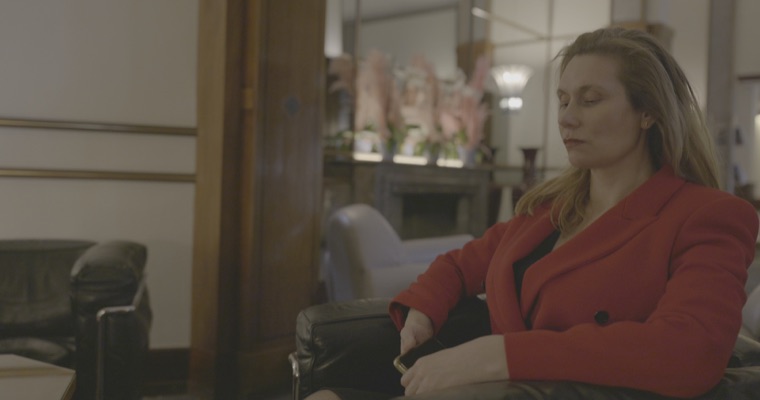 Camera log
 Rec. 709
 Rec. 709 + CinePerfect
Mister Hasard, series in production, graded with CinePerfect · © SpacProd