 ·Manual·Measurements·Pricing
FR·EN·DE·ES·PT
·Manual·Measurements·Pricing
FR·EN·DE·ES·PT
CinePerfect rebuilds the complete optical and photochemical chain: decoding the camera's log, lens defects, diffusion, emulsion response, print. Everything is computed in scene light, in a wide space, and the image is only brought back to Rec. 709 at the very last moment.
Three things to set once. If one is missing, the image will be wrong in a way that is hard to diagnose later.
Effects Browser → category CinePerfect. Drag it onto the clip, or select the clip and double-click the effect.
Can't see it? Check the magnifying-glass menu in the search field at the bottom of the browser: the HDR filter shows only HDR-compatible effects, and CinePerfect outputs Rec. 709. Turn it off.
In the clip's Info inspector, set “Camera LUT” to None. Otherwise Final Cut has already converted your log to Rec. 709, and CinePerfect decodes an already-decoded image a second time. Symptom: a very dark, oversaturated image — or a washed-out one.
Final Cut's camera LUT converts: it makes the log viewable, and stops there. CinePerfect renders: it decodes to the light of the scene, then applies its film curve — highlight rolloff, anchored blacks, soft gamut compression. So the difference you see is not a setting error, it is the rendering at work — and it can be checked: on the calibration chart, mid grey must read 47 % and white must reach 100 %.
Group Input → Source format. This is the most important setting in the plug-in: it determines the decoding curve and the gamut matrix. A wrong choice falsifies all the latitude upstream, and no downstream setting will recover it.
| Rec. 709 | Already-graded material, or a non-log camera |
| Panasonic V-Log | V-Gamut |
| Sony S-Log3 | Two entries: S-Gamut3.Cine and S-Gamut3 — pick the one set in the camera |
| Canon C-Log2 · C-Log3 | Cinema Gamut |
| Apple Log | Rec. 2020 — iPhone Pro, Apple cameras |
| Fujifilm F-Log · F-Log2 | F-Gamut |
| DJI D-Log | D-Gamut |
| Nikon N-Log | Rec. 2020 |
| ARRI LogC3 · LogC4 | AWG3 / AWG4 — Alexa, Alexa 35 |
| Linear | Rec.709 · Rec.2020 · ACES AP0 — RAW decoded to scene-linear, ACES workflows |
Library Properties → Color Processing: choose Wide Gamut HDR, never “Standard”. In Standard, Final Cut hands images to effects in 8-bit: a sky then has only two or three values left, and log decoding stretches that quantisation into visible banding. No setting recovers it — the information is lost before it reaches the plug-in.
Your delivery stays Rec. 709: only the intermediate computation moves to floating point.
CinePerfect still detects an 8-bit source and switches on gradient reconstruction, which breaks the steps into imperceptible noise. It is a safety net, not a substitute for the right setting.
Set the style and strength first, your manual retouches after. Moving either one rewrites the whole preset and erases your retouches. “None” switches every effect off: nothing remains but the log → Rec. 709 conversion. It is also the state of a freshly applied CinePerfect — the plug-in never imposes a look you haven't chosen.
| Style | Its signature |
|---|---|
| Neutral | The CinePerfect foundation alone, with no bias. The clean starting point. |
| Drama | Dense blacks. A restrained rolloff, nothing else — believable in natural light. |
| Crime | Cold, desaturated shadows — the polar. Frank grain. |
| Thriller | Pressure: hard rolloff plus a heavy vignette. Highlights climb sharply. |
| Action | Orange & teal plus tonal punch. Light bloom on the sources. |
| Romance | The glow: warm halation plus a long rolloff, airy blacks. No grain at all. |
| Comedy | Cleanliness — no grain, no mist, no halation. Sharp, bright, poppy. |
| Science fiction | Dense green. Clinical bloom on the sources, no grain and no mist. |
| Period | The exception: the full texture stack, old-print split toning included. |
| Black & white | Silver-gelatin B&W: marked contrast, strong monochrome grain, neutral halation. |
| Blockbuster | The big picture: cool / warm split tone, washed highlights, soft optics. No grain. |
The order of the modules isn't a list: it's the path of light. Knowing it helps you choose which slider to touch.
Everything before stage 07 works in scene light, with no ceiling: you can add energy there without ever clipping. That is why CinePerfect's exposure, contrast and diffusion don't “break” the highlights where a Rec. 709 tool would.
The technical foundation. Temperature is a true chromatic adaptation, not a red/blue gain: raising the Kelvins warms the image while keeping greys neutral. Tint negative goes green, positive goes magenta.
| Setting | Range | Default | Use |
|---|---|---|---|
| Exposure | −3 … +3 EV | 0 | Setting middle grey |
| Temperature | 2000 … 15000 K | 6500 | Warm / cool |
| Tint | −1 … +1 | 0 | Green / magenta |
The most effective way to break the “video” look. It reproduces the birefringence of a cinema camera's anti-aliasing filter: a sub-pixel micro-dispersion that removes electronic bite without blurring the image.
Start at 0.4 – 0.6. Beyond 0.8 the softness becomes visible.
Three distinct phenomena, often confused. They stack happily, but each answers a different intent.
| Module | Origin | Rendering | Radius |
|---|---|---|---|
| Mist | A filter in front of the lens | Diffusion across the whole image, contrast softening | 45 |
| Bloom | Scattering inside the glass | A wide, neutral veil around the sources | 110 |
| Halation | Scattering back through the emulsion | A tight, orange-yellowhalo, hugging the highlights | 18 |
The Threshold for bloom and halation is expressed in screen luminance: 0.50 means “from 50 % brightness upwards”. Lower it to make the effect bite further down, raise it to reserve it for genuine light sources.
The lab's own tool, transposed. The four sliders drive exposure by tonal band before the film curve — so they shape what feeds the rendering, which Rec. 709 wheels cannot do.
| Setting | Range | Default | Effect |
|---|---|---|---|
| Blacks · Mids · Lights · Highlights | −1 … +1 | 0 | ±3 stops on their band |
| Contrast | −1 … +1 | 0 | Pivoted on 18 % grey — perceived exposure doesn't move |
| Highlight rolloff | 0 … 1 | 0,5 | > 0.5 gentle retention · < 0.5 abrupt climb |
One slider, and it does exactly what its name says: the purer a colour, the more it darkens — a deep red becomes deep, not garish. A neutral grey doesn't move an inch. This is how an emulsion's dyes respond, and the exact opposite of raising saturation, which lifts chroma at constant luminance (video's “flashy” look). Saturation lives in its own group for that reason: they are opposite gestures, not two doses of the same one.
Measured on a skin tone: density 0.60 → −5.7 points of luminance for only +0.016 of saturation. Calibrated against the Hollywood · Premier · Soft · Gold prints, which desaturate skin tones rather than saturating them.
Tinting shadows and highlights slightly — the soul of a print: cold shadows, warm highlights. Four plainly named sliders (warmth and tint, per zone), applied in scene light, before the curve, and at constant luminance: the waveform doesn't move, only the vectorscope opens up. Final Cut's wheels work after the curve and cannot produce this.
Start at ±0.3 to ±0.5 per slider. Period uses it out of the box (highlights +0.30, shadows −0.12).
A skin-tone mask that locally attenuates saturation, vibrance, the look LUT and saturation by zone. It only has an effect if one of those modules is working: on its own it does nothing — it's a moderator, not an effect.
It acts at the end of the chain, in screen space. So it does not protect you from the Input settings — temperature and tint — nor from film density: those work in scene light, upstream of the curve, where the mask doesn't yet exist. That is deliberate: white balance describes the lighting of the scene, and exempting a face would light it differently from the set around it.
How dye layers respond on a print: chroma fades away in the shadows and in the highlights. Negative values desaturate. This is what takes digital's “plastic” coloured shadows away.
This module preserves luminance: it is invisible on a waveform. Judge it on the vectorscope (the cloud tightens) or on the RGB parade (the channels converge).
Nine 3D LUTs, applied at the end of the chain with adjustable intensity. The first five each defend a distinct axis — colour and tonality:
| Look | Its axis | Blacks | Contrast | Chroma |
|---|---|---|---|---|
| CinePerfect 1 | The neutral — the clean starting point | 0,024 | 1,61 | 0,62 |
| CinePerfect 2 | Orange & teal: cyan-blue shadows, orange mids and skin tones, whites preserved | 0,029 | 1,53 | 0,70 |
| CinePerfect 3 | Soft — constant warmth, slack contrast, calmed chroma | 0,043 | 1,29 | 0,38 |
| CinePerfect 4 | Cold — blue across the whole scale, hard contrast, deep blacks | 0,015 | 2,04 | 0,49 |
| CinePerfect 5 | Faded — lifted blacks, flattened contrast, olive turn | 0,145 | 1,07 | 0,35 |
The five differ by 0.044 to 0.154 in mean RGB distance — well above the threshold where two looks become interchangeable. Each moves both the colour and the curve.
Then four print emulations — Print · Hollywood, Print · Premier (more contrasted), Print · Soft (softer) and Print · Gold (golden, with muted magentas). These are not simple looks: they replace the plug-in's film curve with the measured response of the positive, the image being fed to them Cineon-encoded as on a telecine. That is why they don't stack on top of the tonemap — they are the tonemap.
Mix blends the result towards a neutral technical conversion — handy for dosing everything at once, or comparing. Broadcast-safe brings you back to the legal 16-235 range: leave it off unless your delivery requires it, Final Cut already handles legality on export.
Before / after split divides the image in two, with a movable line and a choice of orientation — vertical (before on the left) or horizontal (before on top). The “before” side is not the raw image: it is the clean technical conversion, the one you'd have with no module at all — no lens, no OLPF, no diffusion, no look.
Your exposure and white balance are kept on both sides. That is deliberate: you are comparing what the look adds, not your base setup. A wipe that also showed a different exposure would tell you nothing useful.
The split is a comparison tool: no preset touches it, and it does not belong in the final render — remember to switch it off before export.
Every module group carries a Solo, just below its Active. As soon as one is ticked, only the modules thus isolated are computed. They stack: ticking Solo on the OLPF and on halation shows those two together, and nothing else.
The split compares everything with nothing. Solo, on the other hand, compares one thing with nothing. It is the tool of doubt: knowing what a module really contributes when twelve are stacked.
Solo does not switch on the isolated module — it switches the others off. Its Active therefore still governs, and that is deliberate: unticking Active while a Solo is ticked gives you the before/after of that module alone, in one click.
What is never touched: the log decoding and the output conversion — without them the image would not be viewable — along with exposure, white balance and the settings in Output. Nor is skin protection: it modulates the other modules, it is part of their setting.
Twelve boxes spread across collapsed groups means twelve ways to leave a Solo ticked without remembering — and not to understand why the image is wrong. The “Clear all solos” button, in Output, switches them all off at once. Like the split, solo does not enter the final render: think of it before exporting.
In the video inspector, whatever sits above is applied first. CinePerfect expects camera material at its input and delivers a finished Rec. 709 image. Everything follows from that.
| Tool | Position | Why |
|---|---|---|
| Wheels / Curves / Color Board | Below CinePerfect | These are Rec. 709 tools. Above, they'd be working on log — a wrong and destructive move. |
| Primary exposure, balance, contrast | Inside CinePerfect | Its own settings act in scene light, before the film curve: far more latitude. |
| Secondaries, masks, shapes | Below CinePerfect | You isolate on the finished image, the one you can see. |
| Crop, stabilisation, Ken Burns | Below CinePerfect | Grain, vignette and lens defects must stay locked to the final frame. |
| Another LUT, log conversion, camera LUT | Nowhere | Double conversion guaranteed. CinePerfect already does the decoding. |
| Sharpening | Avoid | It undoes exactly what the OLPF has just put in. |
Unsure of the order Final Cut is really applying? Push a colour wheel all the way. If the image turns hard, it applies after CinePerfect. If it comes out digested and softened, it runs before. Reset it and file it accordingly.
Right-click the effect's name in the inspector → “Save Effects Preset”. Final Cut saves every setting and files it in the Effects Browser. The ten shipped styles are starting points; these will be your films' looks.
The trio that covers the most ground, without touching colour.
OLPF 0.5 · Mist 0.12 · Grain 0.2, size 1.2Letting the light spill without washing out the rest of the image.
Bloom on · threshold 0.65 · radius 130 · intensity 0.3Protection modulates the LUT where it matters.
Skin protection on · 0.6Work upstream of the curve: highlights realign without blocking up.
Exposure, then Blacks / LightsDigging without drowning: desaturating the shadows does the work.
Blacks −0.3 · Contrast +0.25One slider, as a last resort, rather than ten retouches.
Output → Mix 0.7The signature of a print: cold shadows, warm highlights — without touching exposure.
Split tone on · Shadows warmth −0.3A silver-gelatin B&W in one click, sepia in two more.
“Black & white” style| Symptom | Most likely cause |
|---|---|
| Very dark, oversaturated image | Camera LUT still active in the Info inspector — double decoding. |
| Washed-out image, blacks sitting halfway up | Broadcast-safe switched on when the delivery doesn't require it. |
| Halation or bloom invisible | The threshold is too high for the shot. Bring it down towards 0.45. |
| The halo spills into the shadows | The threshold is too low: it starts below middle grey. Raise it. |
| My retouches keep disappearing | The style or its strength was moved again — the preset rewrites itself. |
| Split tone seems inert | It works at constant luminance: judge it on the vectorscope, not the waveform — and on a contrasty image. |
| A new group is missing | Delete the effect and re-apply it: parameters are frozen when it's placed. |
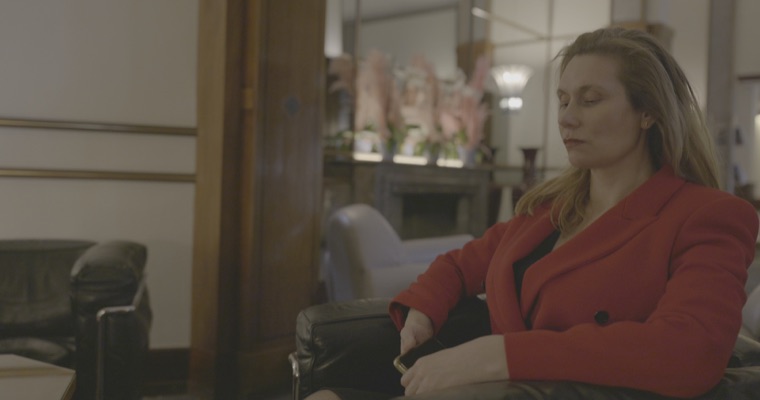 Camera log
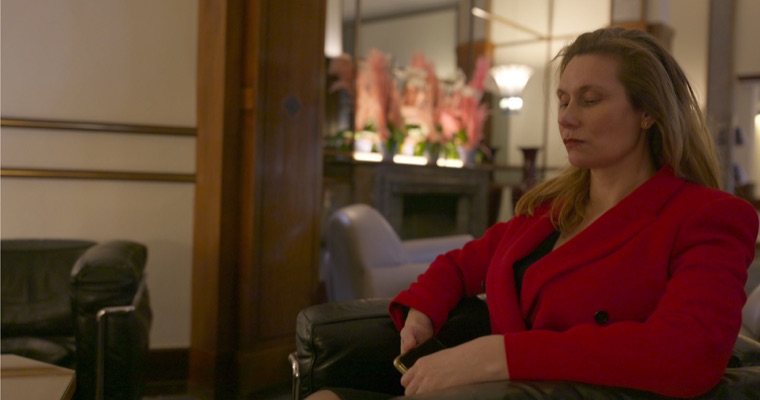 Rec. 709
 Rec. 709 + CinePerfect
Mister Hasard, series in production, graded with CinePerfect · © SpacProd